Why Won't Instagram Let Me Like Posts? Unlocking Your Action Block and Fixing the Frustration
Ugh. The sheer frustration of scrolling through your feed, finding the perfect puppy picture or a genuinely hilarious meme, tapping the little heart icon, and… nothing. Or worse, getting a cryptic error message like "Action Blocked" or "Try again later."
If you're asking, "Why won't Instagram let me like posts?" you are definitely not alone. It’s one of the most common, yet annoying, digital roadblocks. It feels personal, but 99% of the time, it’s just Instagram's vigilant (and sometimes overzealous) security systems flagging your activity as suspicious or too fast.
I remember the first time this happened to me. I had just spent an hour doing a massive clean-up of my feed, liking posts I had missed over the previous few weeks. Suddenly, the liking mechanism shut down entirely. I thought my account was broken! Turns out, I had just tripped an invisible alarm wire.
Let's dive deep into the specific reasons this happens and, crucially, how you can fix it and get back to showering your favorite creators with hearts.
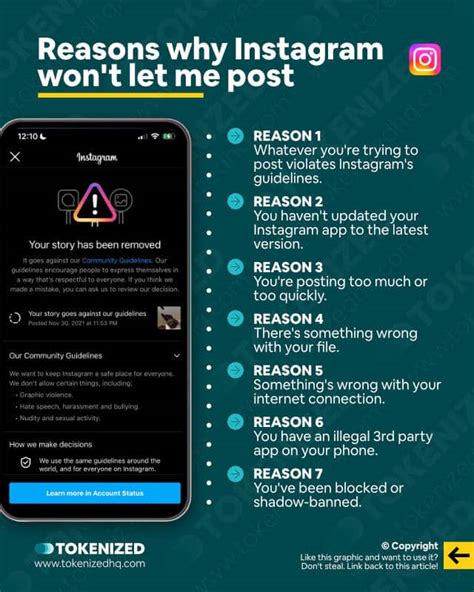
Phase 1: Quick Diagnosis – Is It Me, Or Is It The App?
Before panicking about a permanent ban, we need to rule out the simplest, most common technical hiccups. Sometimes, the inability to like posts isn't an algorithm punishment—it's just a digital glitch.
If you find that Instagram is preventing you from liking posts, start with these immediate checks:
- Internet Connection: Are you on stable Wi-Fi or cellular data? A slow or intermittent connection can cause actions (like sending a "like" request) to fail repeatedly, leading the app to temporarily pause your ability to try again.
- Is Instagram Down? Believe it or not, Instagram's massive servers occasionally hit snags. Check reliable external sites like DownDetector. If the platform is experiencing widespread server downtime, liking won't work for anyone.
- App Version: When was the last time you updated the Instagram app? Using an outdated version can lead to bugs and functionality failures. Head to the App Store or Google Play and ensure you have the latest build installed.
- Corrupted Cache: Over time, the app stores a massive amount of data (cache) to load faster. Sometimes this cache gets corrupted. Clearing it (on Android) or simply deleting and reinstalling the app (on iOS) can work wonders.
If you've checked all these basics and the problem persists, it's time to face the inevitable truth: you have likely encountered an Instagram Action Block.
Phase 2: The Action Block – Hitting Instagram's Invisible Limits
The number one reason you can’t like posts is that the platform suspects you might be a bot. Instagram’s priority is preventing spam and fake engagement. To do this, they set extremely strict, yet unpublished, limits on how fast you can perform actions like liking, commenting, and following.
When you exceed these limits too quickly, the system automatically flags your account and enforces a temporary restriction, known universally as an "Action Block."
The Critical Limits You Might Have Exceeded
Let's be clear: Instagram never tells us the exact numbers. However, based on years of user data and SEO content writer experience, we have strong estimates regarding the acceptable speed of engagement:
- Hourly Limits: You should generally aim for fewer than 60-100 likes per hour. If you sit down and blitz through 200 posts in ten minutes, you are screaming "robot" to the algorithm.
- Daily Limits: The safe zone for likes per day is typically under 500. Some highly established, older accounts can get away with more, but newer accounts are monitored much more closely.
- Suspicious Behavior: Rapidly liking a post, then immediately un-liking it, or performing a massive string of likes and then suddenly switching to massive following sprees—these inconsistent, rapid shifts in behavior are major red flags for the Instagram algorithms.
Temporary Restriction vs. Extended Block
Action Blocks usually fall into two categories:
1. Temporary Block (The Wait-and-See): This usually lasts anywhere from 12 to 24 hours. The block often says something simple like, "Try again later." This happens when you accidentally go slightly over the limit during peak usage.
2. Extended Block (The Serious Warning): These can last 48 hours, 7 days, or even longer. This level of action block often occurs if you repeatedly violate the limits, or if the action block includes other restrictions (like preventing comments or follows). Crucially, these blocks sometimes require you to hit an "Tell Us" or "Report a Problem" button to even begin the resolution process.
Phase 3: Deep Dive into Technical and Account Integrity Issues
If the action block isn't purely about liking too fast, the restriction might be linked to the overall integrity and security of your account. These issues often require more than just waiting it out.
Using Third-Party Automation Apps
Are you, or were you ever, using a service that promises to auto-like or auto-follow for you? If so, this is almost certainly the source of your restriction. Instagram strictly prohibits automated engagement tools. Even if you stopped using the service months ago, your account might still be penalized if the platform detected the activity.
If you suspect this is the case, immediately revoke access for all non-official Instagram apps. Go to Settings > Security > Apps and Websites and remove anything that looks suspicious or unnecessary.
Security Checkpoint Triggers (VPN and Location Changes)
Instagram wants to make sure *you* are using your account. If you log in from your home city, and then five minutes later, log in using a VPN server located on the other side of the world, this triggers immediate security concerns. The system assumes your account has been hacked or compromised, and will often lock down engagement functions (including liking) until the identity is verified.
If you regularly use a VPN, try logging into Instagram only when the VPN is disabled, or use a consistent, localized server.
The Shadowban Misconception
Sometimes users confuse the inability to like posts with a dreaded "shadowban." A shadowban primarily refers to suppressed visibility (your posts don't show up in hashtags or explore pages). While frustrating, an inability to like posts is a direct functional block, not a visibility issue. However, repeated action blocks can certainly contribute to your account's poor overall standing, which might lead to reduced visibility later on.
Phase 4: Fixing the Problem and Preventing Future Restrictions
So, you are blocked. How do you get the heart button working again? Recovery requires patience, consistent action, and a bit of humility towards the algorithm.
1. The Golden Rule: Wait It Out and Rest
The single most effective solution is to stop doing the blocked action entirely. If you can't like, don't try for 24 to 48 hours. Seriously. Don't even open the app to test it every hour.
During this "digital detox," the system registers that the suspicious activity has ceased, and the action block timer can reset correctly.
2. Reset Your Digital Footprint
If the wait period doesn't work, take these steps to signal to Instagram that a legitimate human is back in control:
- Change Your Password: Changing your password forces a log-out on all devices, which often clears out residual sessions from third-party apps or buggy connections.
- Link Another Account: Temporarily link your Instagram to a different social platform (like Facebook). This subtly verifies your identity as a real user.
- Use Mobile Data Only: For the first 24 hours after a block, try engaging only via mobile data, not your usual home Wi-Fi. Sometimes, IP addresses can be temporarily flagged if they are associated with multiple accounts acting suspiciously.
3. Engage Intentionally (The Trust Building Phase)
Once your liking ability is restored, you must ease back into using the feature. Focus on quality engagement, not quantity.
- Slow Down the Rhythm: Take breaks between scrolls. Like 10 posts, then scroll for a minute without touching the heart button.
- Mix Up Actions: Don't just like. Spend time commenting (meaningful comments, not just emojis), watching Stories, or saving posts. Varied engagement signals human behavior.
- Complete Profile Information: Ensure your profile picture is set, bio is filled out, and two-factor authentication is enabled. A fully fleshed-out account looks less like a temporary spam bot.
Dealing with an Instagram Action Block is annoying, but it's rarely permanent. By understanding the invisible limits and adjusting your engagement speed, you can quickly regain control of your account and ensure your heart taps register every time.
